
Your Employees are Your Strongest Defense
Many of us start our day by logging in. It could be logging in to your phone, your workstation, badging into your office, and so on. Access is granted via your digital identity. Your digital identity is the new perimeter.
Hackers no longer need to break in by exploiting complex software vulnerabilities; they simply log in using stolen credentials.
Digital identity has become the primary target because it provides the path of least resistance to an organization's most sensitive assets.
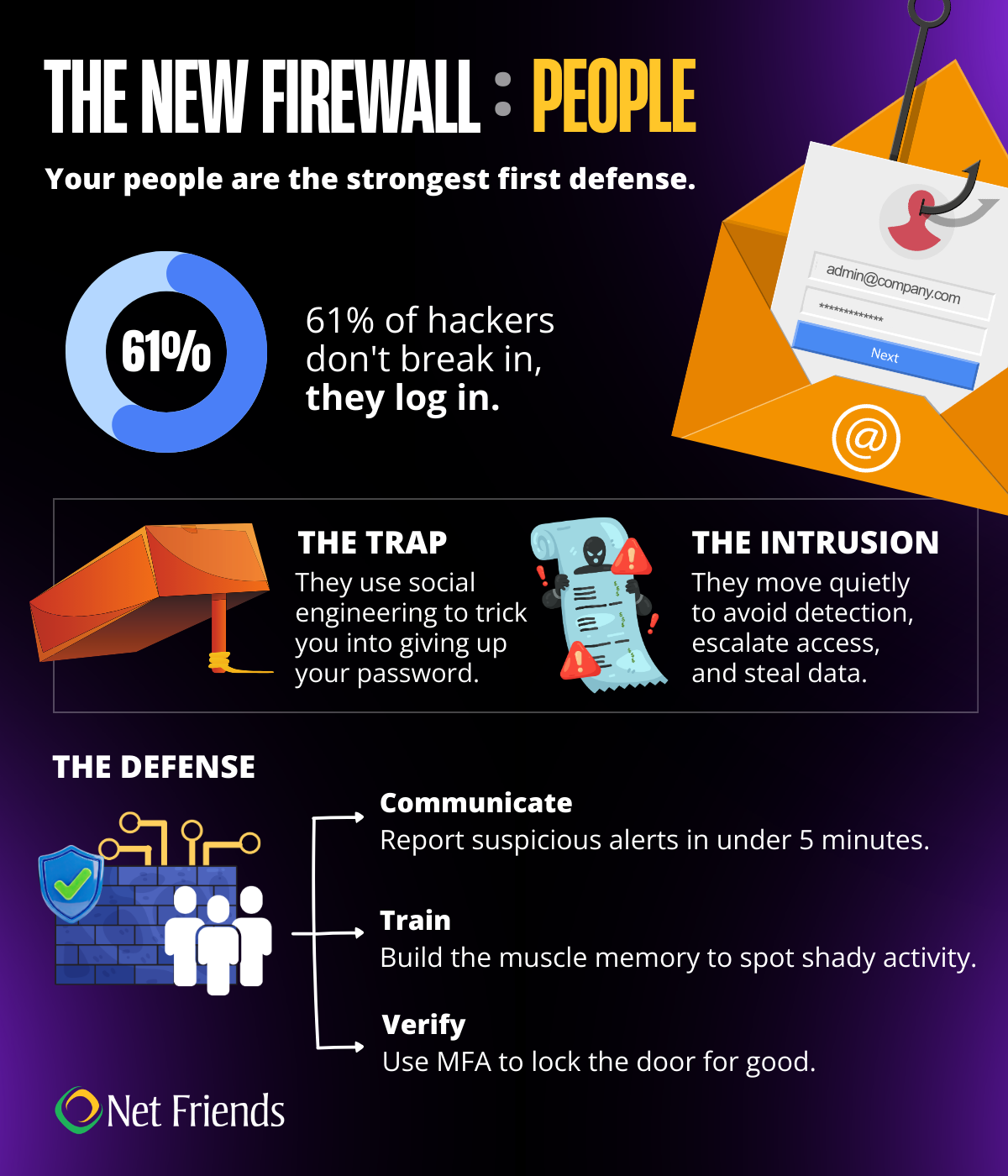
As companies strengthened their defenses by building firewalls and perimeter security, hackers have turned to other means of gaining access. About 61% of all breaches now involve the use of stolen credentials. Once inside, an attacker is not detected as a threat to the system. They are you. This allows them to bypass traditional security hurdles that only look for external intruders.
How They Get In
Hackers are looking for ways to get your password. Having good password practices is a reasonable first defense. But having strong, unique passwords is no longer enough on its own. Tools like Multi-Factor Identification, Single-Sign-On, and biometric identity verification make it harder for you to be impersonated.
First, how do they get in?
- Phishing & Social Engineering: Tricking you into giving them your password. This tactic is the most effective and where most breaches begin.
- Malware: Software that scrapes saved passwords from your browser or records your keystrokes. This software is often installed as part of a phishing strategy that asks you to download a compromised attachment or file.
- Credential Stuffing: Using passwords leaked from other site breaches, betting you reused the same one for work.
Once a hacker figures out your login, your digital identity is no longer your own. They can move through your systems and look for weaknesses without being stopped.
Quiet Intrusion
Once an attacker logs in with your credentials, they do not immediately start raiding the vault. That kind of loud, erratic behavior triggers behavioral analytics and security alerts. Instead, they engage in a period of silent reconnaissance. They spend hours, sometimes days, blending in. They read your emails to understand your tone, browse the internal wiki to map out the company’s data hierarchy, and identify which databases contain the most sensitive information. This "living off the land" technique allows them to operate under the guise of your daily routine, making them nearly invisible to standard monitoring.
The hacker’s goal is to move from your accounts and access the broader company data. They use your account as a staging ground to probe for vulnerabilities in the internal network. If they find a server that has not been patched or a shared folder with loose permissions, they hop from your identity to a more powerful one, a process known as privilege escalation.
Lateral Movement
As the attacker moves sideways through the company’s databases, they are looking for customer PII, intellectual property, or financial records. Because they have escalated their privileges, they can often disable logging or delete their own tracks as they go. This allows them to exfiltrate massive amounts of data over a long period without anyone noticing a spike in traffic.
In many cases, the intruder will also seek out the company’s backup servers, quietly corrupting or deleting them to ensure that when they finally do strike with ransomware, the company has no choice but to pay.
The impact of this kind of breach is rarely contained to one person or one department. It is a systemic failure that can result in significant recovery costs, legal penalties, and a loss of customer trust.
Hardening the Human Firewall
What can we do? How do we stop this strategy? Your people are the strongest first defense. Think of them as your human firewall. Teaching and empowering employees to identify and report things that seem strange is a powerful tool in stopping hackers in their tracks. The hackers are counting on no one noticing them.
Culture of Communication
Creating an environment where employees feel safe to report that they have entered a password into a fake site or approved a suspicious MFA notification is the first step. It is common to feel embarrassed or try to fix your mistake quietly. However, hackers rely on that window of silence to move laterally into the company's financial or customer databases.
By reporting the breach in under five minutes, the security team can lock down the backdoor before the hacker can escalate their privileges.
This requires a safe environment to report things, even if they turn out to be false reports. At Net Friends, we see many employees reporting things that are legitimate, but they were unsure. This level of vigilance is applauded.
Update Tools
Passwords are no longer enough. True security now relies on a Zero Trust architecture, where the system constantly verifies your identity even after you have logged in.
MFA: Multi-Factor Authentication (MFA) is much harder to intercept than a standard text message code. Linking MFA to an authentication app that rotates identity codes is a strong barrier. Additionally, MFA will alert a user to someone trying to use their log in. Remember, do not approve alerts unless you know you initiated them!
SSO: Single-Sign-On (SSO) allows a one-time sign on and then acts as a master key as employees move through their day. This tool does not use a password that can be stolen, rather it uses digital tokens to verify identity. It also allows IT to quickly shut down the credentials for an employee.
These tools provide an extra layer of validation that you are who you say you are. It is important that employees use these tools and do not blindly approve any notifications.
Training
Cybersecurity training often feels like hitting the replay button on information you have heard a thousand times. While the concepts might be familiar, the goal is not just to teach you something new, it is to sharpen how you react.
In the middle of a busy workday, our brains are juggling a million tasks and making split-second decisions. These trainings act as a refresher to build the muscle memory needed to spot a dangerous email or a shady website instantly, even when you are distracted.
The Human Firewall is the critical security layer formed by informed individuals rather than digital code. By exercising healthy skepticism and following strict verification protocols, an alert user can stop a hacker in their tracks. Whether a bad actor is trying to log in using a stolen password or tricking someone into handing over a credential, a strong human firewall identifies the red flags and shuts down the breach before the first click even happens.
Net Friends Can Help
Let Net Friends help you harden your human firewall and transform employees into proactive defenders against identity theft and Living off the Land attacks. We bridge the gap between human intuition and technical defense, by implementing strategies like MFA, SSO and cybersecurity training to ensure that even if a hacker mimics a legitimate login, a trained and skeptical workforce stands ready to flag and block the intrusion.
Book a meeting with one of our IT Experts!
Follow us on LinkedIn
More Reading:
Social Engineering 101: Understanding Common Tactics
Social Engineering 101: How to Safeguard Your Business
Top 10 Basic Security Trainings to Build Your Cybersecurity Culture

Take IT Off Your To-Do List.
Tech holding you back? Losing productivity to downtime?
Discover how we can simplify your tech and free up your time, contact us today.
At Net Friends, we believe in the power of human expertise. While we leverage AI to enhance our content and processes, all blog posts are written and edited by our knowledgeable staff. You can trust you are getting insights directly from our team.